Today's Maker Project of the Week comes from the folks at MAKE. The Mini Blind Minder uses a thermostat to determine if the blinds should be opened or closed. It would be cool to add a light sensor to ensure that we don't open the blinds when the sun is below the horizon.
Showing posts with label How To. Show all posts
Showing posts with label How To. Show all posts
Monday, February 3, 2014


Thursday, January 23, 2014
How to Radiate Information
Agilists talk about "Information Radiators." An information radiator is a place (usually a wall) where team members and guests can inform themselves about project / release /iteration details without asking anyone a question. The most common information radiator is a team Kanban board with cards or sticky notes identifying current backlog items with their status.
This is not the eye candy found in most offices!
If you are seeing the Kramer poster (or your organization's equivalent) and no meaningful information radiators - your agile score is not very high. On the positive side, adding a meaningful information radiator for your project / release / iteration is a great step on the path to becoming agile.
It's an Information Radiator if
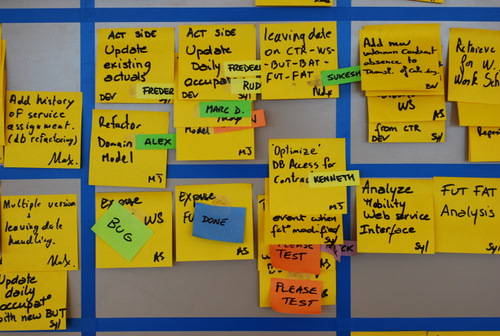 |
| Information Radiator: GOOD! |
This is not the eye candy found in most offices!
 |
| Eye Candy - Fun, but not as helpful |
It's an Information Radiator if
- Regularly Updated by your Team
- Team Members and Visitors Read and Understand the Information Presented
- No one Worries about Fonts and Formats
- Everyone Thinks about Content and Process
Thursday, November 14, 2013
How to: Plan for your Professional Development
 |
| CLick to shop at Amazon |
Your professional development plan can be a simple list. You may be pursuing a degree, certification, or specific skill. The point is - have a plan!
Here is my current plan:
- COMPLETED (Yeah!)
- MBA
- PMP
- CC (Toastmasters Competent Communicator)
- Maintenance Required
- PMP - 60 PDUs before 11/4/2015 (Done :))
- In Progress
- Agile Certified Practicianor (PMI-ACP) Target Completion 1/2014
- Toastmasters Advanced Communicator Bronze (ACB) Target Completion 4/2014
- Desired (Later)
- Six Sigma Black Belt
- ITIL Foundation
Three Reasons to have a published professional development plan:
- Celebration - Looking at your accomplishments to date is fun and provides positive energy
- Motivation - In today's gamified world, something as simple as a todo list where you can mark accomplishments complete is very motivational. Go a step further by awarding yourself gold stars or framing certificates and hanging them on your wall (phisical or virtual)
- Reinforcement - as a working project manager, this type of planning and goal setting reinforces the fact that I am organized and motivated to all who see it (aren't you impressed?).
Thursday, October 10, 2013
How to take mid-air photos
Sometimes a "How To" comes along that, while not specific to Project Management, is just too good to pass up.
Today's "How To Thursday" post features an instructables.com item called "Automatically Take Perfect Jump Shots" by user ElectricSlim.
First - the video - worth a view even if you have no interest in the subject matter. This is fine art!
Here is the link to the Instructable. This uses a web cam and software that detects faces. The height of the face triggers the image capture. It works almost every time :)
http://www.instructables.com/id/Automatically-Take-Perfect-Jump-Shots/
Today's "How To Thursday" post features an instructables.com item called "Automatically Take Perfect Jump Shots" by user ElectricSlim.
First - the video - worth a view even if you have no interest in the subject matter. This is fine art!
Here is the link to the Instructable. This uses a web cam and software that detects faces. The height of the face triggers the image capture. It works almost every time :)
http://www.instructables.com/id/Automatically-Take-Perfect-Jump-Shots/
Subscribe to:
Posts (Atom)