My Kindle Fire has become one of my go-to tools. I carry it with me everywhere (in my brief case) and feel lost if I leave home without it. I decided to go the Kindle route last year when I took the Consulting Director role with Enfocus Solutions. I needed to read ten or fifteen books on business analysis and wanted them all near at hand while traveling. This has proven to be a great decision. I'm currently studying for my PMI-ACP exam (scheduled for February 25th) and I have two exam prep books on my Kindle. This lets me sneak in a quick study session several times each day.
I recommend the Kindle to any active and traveling professional.
Click and Shop
Support this Blog
Showing posts with label Tools. Show all posts
Showing posts with label Tools. Show all posts
Tuesday, February 4, 2014


Tuesday, January 28, 2014
Tools - Paymo
One challenge for a project manager is creating estimates, managing time sheets, and for some of us, creating invoices. I've been using Paymo.biz to handle these functions and find that it is easy an intuitive.
Here is an ad from Paymo:
Note that the "Tasks" in Paymo represent time tracking level tasks (big chunks of time, not little chunks of time). Here is a screen cast showing how to set up "Projects" and "Tasks":
I think of "Project" as "Client" and "Task" as either "Project" for little projects or "Activity" for big projects.
Paymo has a free version (very limited) for you to try. This is a service - not a download.
Here is an ad from Paymo:
Note that the "Tasks" in Paymo represent time tracking level tasks (big chunks of time, not little chunks of time). Here is a screen cast showing how to set up "Projects" and "Tasks":
I think of "Project" as "Client" and "Task" as either "Project" for little projects or "Activity" for big projects.
Paymo has a free version (very limited) for you to try. This is a service - not a download.
Tuesday, December 10, 2013
Agile Manifesto
Today's tools post shares the Agile Manifesto.
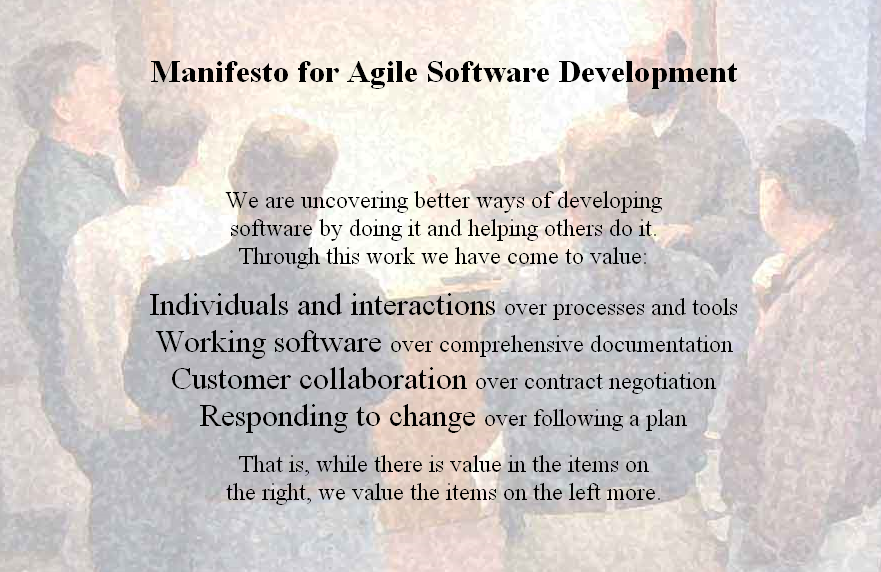
This simple manifesto, along with 12 principles that accompany it, have had a fantastic impact on my industry (Information Technology). I urge you to memorize and understand these agile values, and apply them to your business and personal life.
This simple manifesto, along with 12 principles that accompany it, have had a fantastic impact on my industry (Information Technology). I urge you to memorize and understand these agile values, and apply them to your business and personal life.
Start at the Top
I often see people jump into agile by trying scrum, or kanban, or crystal clear. The critical step that they miss is to understand the overriding values of agile. The values expressed in the agile manifesto. Start your agile journey by studying the agile manifesto! If you are on your journey, refer to the manifesto often.Sign On
Find the manifesto at www.agilemanifesto.org and consider becoming a signatory. I signed a few years ago, when I started my agile journey. I just finished training for my PMI-ACP (Agile Certified Professional) certification and it was fun and refreshing to get back to first values when we studied the manifesto.Tuesday, November 12, 2013
Tools: The Power Pose
Today's Tool tip is the "Power Pose." I learned this from Amy Cuddy's Ted Talk (find it here). Holding a "Power Pose for two minutes makes you more confident and capable. Here is the "Superman" (Amy uses "Wonder Woman - but . . . . . )
 |
| Superman (AKA Wonder Woman) Pose Try it! 2 Minutes! |
My favorite is sitting at my desk, leaning back, and locking my fingers together behind my head. Two minutes is a great mental break, and Amy assures us that only good things come from this exercise.
 |
| P O W E R ! |
Try it!
Tuesday, November 5, 2013
Tools Tuesday - Six Ways I Use Webinars
I view online and recorded webinars. Carefully selected webinars give me great value for time spent.
Six ways I Use Webinars:
Add webinars to your Professional Development Plan and use them to fill in the slow times while gaining information, insights, and qualifications.
Six ways I Use Webinars:
- To maintain my credential (PMI-PMP). It is easy to find webinars offered by PMI Registered Education Providers (REPs) so that the PMI-PDU bookkeeping is easy. If you pony up for a PMI membership, there are several good webinars offered by the various Communities of Practice via the PMI Site (Look in myPMI).
- For "Just in Time" training when I undertake a new or less-familiar task.
- To ensure that my organization's processes and procedures are industry best practice and sometimes to find opportunities to improve processes and procedures.
- To entertain myself during those rare times when I've done everything I can for my projects (See maintaining my credential above).
- To test drive areas as I consider taking additional in-depth training. For example, do I want to study for, and sit for the ITIL foundation certificate?
- To introduce myself to thought leaders in my industry.
Add webinars to your Professional Development Plan and use them to fill in the slow times while gaining information, insights, and qualifications.
Tuesday, August 13, 2013
Tools - The GROW Model
The GROW Model is a excellent framework for coaching, a key technique for project managers.
The acronym GROW stands for:
Goal (What is your goal?)
Reality (What is the current reality?)
Options and Obstacles (What are your options? What is stopping you?)
Way Forward (How will you proceed?)
I've covered the GROW model before. Today I cover the GROW model in the context of our new Tools Tuesday series by demonstrating the technique.
Coach: What are your current goals
PM: I want to relocate to the west part of the state where I hope to retire, and find a project management challenge to keep me excited and engaged up to retirement.
Coach: What is your current reality?
PM: I just finished a contract and am looking for my next challenge.
Coach: What are your options?
PM: I've been approached about a couple of opportunities in my desired location.
Coach: What are your current obstacles?
PM: Nothing is standing in my way. I do need to land my next gig fast for cash flow purposes. Thank G*d that I am in a good position financially.
Coach: How will you move forward?
PM: Continue to pursue opportunities in my desired locations - if I haven't landed well in three weeks, open a national job search.
Observations:
This model makes coaching sessions easy - and helps the coach to step back and allow the person being coached to do most of the talking
The acronym GROW stands for:
Goal (What is your goal?)
Reality (What is the current reality?)
Options and Obstacles (What are your options? What is stopping you?)
Way Forward (How will you proceed?)
I've covered the GROW model before. Today I cover the GROW model in the context of our new Tools Tuesday series by demonstrating the technique.
Coach: What are your current goals
PM: I want to relocate to the west part of the state where I hope to retire, and find a project management challenge to keep me excited and engaged up to retirement.
Coach: What is your current reality?
PM: I just finished a contract and am looking for my next challenge.
Coach: What are your options?
PM: I've been approached about a couple of opportunities in my desired location.
Coach: What are your current obstacles?
PM: Nothing is standing in my way. I do need to land my next gig fast for cash flow purposes. Thank G*d that I am in a good position financially.
Coach: How will you move forward?
PM: Continue to pursue opportunities in my desired locations - if I haven't landed well in three weeks, open a national job search.
Observations:
This model makes coaching sessions easy - and helps the coach to step back and allow the person being coached to do most of the talking
- The GROW model works just fine for self-coaching sessions
- Documenting a GROW session allows for easy follow up
- Illustrates changing goals
- Tracks progress against goals
- Identifies obstacles that the coach may be able to help eliminate
Wednesday, August 15, 2012
WeUseThat.com - great source of tools knowledge
This post introduces you to WeUseThat.com. I found WeUseThat.com via the Beeminder.com blog (Thanks Bethany and Dan!).
Simply put, WeUseThat.com is a bunch of interviews with startups focusing on how they get things done. I've started reading these interviews and it is fascinating to read about the tools that these successful startups use, why they select them, and what they want but can't find (yet).

Simply put, WeUseThat.com is a bunch of interviews with startups focusing on how they get things done. I've started reading these interviews and it is fascinating to read about the tools that these successful startups use, why they select them, and what they want but can't find (yet).

Wednesday, June 27, 2012
Tools Rant!
<RANT>
I can't understand why information technology professionals so often use the wrong tools!
Pardon my frustration, but I ran into this over and over today. The right tool makes work a joy, the wrong tool makes it a misery. Kind of like this H&R Block commercial . . .
For some people, the spreadsheet is the only tool in the tool belt. As good as spreadsheets are for financial analysis and what if analysis - they are not database management systems.
For others, the Project Portfolio Management system is the be all and end all. Ditto reporting tools, case tools, word processing tools, editors, IDEs, . . . The list is endless.
My advice is to take a quick look at the beginning of a task or activity to see if you are using the best tool for the job. I've seen too many professional service hours squandered over poor tools choices - often by other than the person charged with delivery.
Thanks for your concern - I'll get over this . . .
</RANT>
I can't understand why information technology professionals so often use the wrong tools!
Pardon my frustration, but I ran into this over and over today. The right tool makes work a joy, the wrong tool makes it a misery. Kind of like this H&R Block commercial . . .
For some people, the spreadsheet is the only tool in the tool belt. As good as spreadsheets are for financial analysis and what if analysis - they are not database management systems.
For others, the Project Portfolio Management system is the be all and end all. Ditto reporting tools, case tools, word processing tools, editors, IDEs, . . . The list is endless.
My advice is to take a quick look at the beginning of a task or activity to see if you are using the best tool for the job. I've seen too many professional service hours squandered over poor tools choices - often by other than the person charged with delivery.
Thanks for your concern - I'll get over this . . .
</RANT>
Thursday, December 22, 2011
Lightscreen
When you need a good light screen capture utility, try Lightscreen. I found a recommendation for this tool in a gantthead blog over a year ago, and have used it ever since. One trick - go to options and set it up to store captures into the clipboard - this is not default behavior.
I still use Jing when I need video capture and more control over screen capture, but Lightscreen is very good when the requirements are not to heavy.

I still use Jing when I need video capture and more control over screen capture, but Lightscreen is very good when the requirements are not to heavy.

Friday, December 2, 2011
Jing - Cool Tool for screen capture - still and video
Another PM on my project saw me using Jing and asked for the details. I've decided to post the details here for everyone.
Jing, by Techsmith is a free software utility for capturing screen shots and screencasts. I love this tool!
Hat tip to Stephanie H. for turning me on to Jing several months ago :)
Here is a short video tour:
Jing, by Techsmith is a free software utility for capturing screen shots and screencasts. I love this tool!
Hat tip to Stephanie H. for turning me on to Jing several months ago :)
Here is a short video tour:
Saturday, December 25, 2010
Tools: Follow up on Sticky Sorter from Microsoft Labs
Well, I gave it a try.
Recall that I posted about a post-it note application called Sticky Sorter from Microsoft Labs.
After giving this tool a good trial, the original promise failed to deliver. The limitation is space on my desktop. Although the tool allows you to "stack" notes, it is just not flexible enough to navigate through a large number of items.
Pass on Sticky Sorter and use a mindmapper for brainstorms, lessons learned, and creative work. I'll post my favorite mindmappers for you soon.
Here is a link to the oringinal post:
Tools: Sticky Sorter from Microsoft Labs
Recall that I posted about a post-it note application called Sticky Sorter from Microsoft Labs.
After giving this tool a good trial, the original promise failed to deliver. The limitation is space on my desktop. Although the tool allows you to "stack" notes, it is just not flexible enough to navigate through a large number of items.
Pass on Sticky Sorter and use a mindmapper for brainstorms, lessons learned, and creative work. I'll post my favorite mindmappers for you soon.
Here is a link to the oringinal post:
Tools: Sticky Sorter from Microsoft Labs
Wednesday, December 15, 2010
Tools: Sticky Sorter from Microsoft Labs
Todays tool is StickySorter from Microsoft Labs.
I have been playing with this tool and considering it for a phase postmortem using a projector with my team all in one conference room.
You may download StickySorter at http://www.officelabs.com/projects/stickysorter/Pages/default.aspx. The executable installs locally on a PC and provides a "Wall" that you can place virtual sticky notes on. Files are saved as CSV files and are easily opened and editted using Microsoft Excel.
This screen shot should tell you everything you need to know:

The Verdict:
Simplicity: Grade A+
Ease of Use: Grade A-
Cloud Capability: N/A
I have been playing with this tool and considering it for a phase postmortem using a projector with my team all in one conference room.
You may download StickySorter at http://www.officelabs.com/projects/stickysorter/Pages/default.aspx. The executable installs locally on a PC and provides a "Wall" that you can place virtual sticky notes on. Files are saved as CSV files and are easily opened and editted using Microsoft Excel.
This screen shot should tell you everything you need to know:

The Verdict:
Simplicity: Grade A+
Ease of Use: Grade A-
Cloud Capability: N/A
Subscribe to:
Posts (Atom)